The short version
Every trades owner with two or more techs running jobs independently has three anxieties they carry all day: did the job actually get done properly, did the tech collect the right amount, and did the customer get a receipt? These aren’t small worries — one uncollected job or one angry customer who “never got a receipt” can cost you more than a day’s margin. The solution is a job-close workflow that handles all three automatically: the tech charges the card in the field, snaps a photo of the completed work, and sends the customer a text receipt — all from their phone, before they leave the driveway. The job record, the payment, the proof, and the customer confirmation are all in one place before the truck pulls away. This is what that looks like in practice.
Running a multi-tech trades business means spending a significant part of your day operating on trust. Your tech is at a job across town. You don’t know exactly what happened. You’re waiting for a text, or a call, or you’ll just find out when the day ends and you piece it together from memory and receipts.
Most trades owners who’ve grown past two techs know the specific anxiety: the job was “done,” but you’re not really sure what was done, whether the amount collected was right, whether the customer actually got anything in writing, or whether there’s documentation if the customer calls back next week saying the work wasn’t finished. The whole thing lives in your tech’s head and your group chat, and neither of those is a filing system.
This post is about the specific workflow that closes that loop — what the end of a job should look like from your tech’s phone, step by step, so that by the time the truck pulls away you have proof, payment, and a paper trail without making a single phone call.
The three things that go wrong when techs close jobs manually
Before the workflow, it’s worth naming exactly what the manual system breaks, because each failure has a real cost.
Payment leakage. When payment isn’t collected at the door, it turns into an invoice. Some invoices age. Some age into disputes. Some disappear entirely because the customer “thought they already paid” and the tech thought the owner was following up. Billing customers who won’t pay is a solvable problem — but it’s far better to not create it in the first place. In-field payment at job close is the best prevention.
No documentation when disputes arise. A customer calls a week later and says the work wasn’t completed, or the wrong part was installed, or the tech made a mess and left. You have no photos, no completion record, and no way to verify what actually happened. You’re arguing from memory against a customer who’s writing a Google review. Photos taken at job close — timestamped, attached to the job record — change that conversation entirely.
Customer gets nothing in writing. A customer who doesn’t get a receipt doesn’t just feel uneasy — they’re also more likely to dispute the charge later, more likely to leave a vague negative review, and less likely to call you back next time. A text receipt sent from the field, the moment the job closes, is the professional signal that you’re a real operation. It also creates a paper trail for the customer that prevents the “I never got anything” dispute.
The workflow: what job close looks like on the tech’s phone
Here’s the sequence, in order. The whole thing takes under two minutes and happens before the tech gets back in the truck.
Charge the card in the field
The tech opens the job in the app, enters the job amount, and charges the customer’s card on-site — before leaving. The payment processes through Stripe. No invoice to follow up on later, no cash changing hands with nothing recorded, no “I’ll send you a payment link.” The money is collected and the job amount is recorded in the system the moment the card is charged.
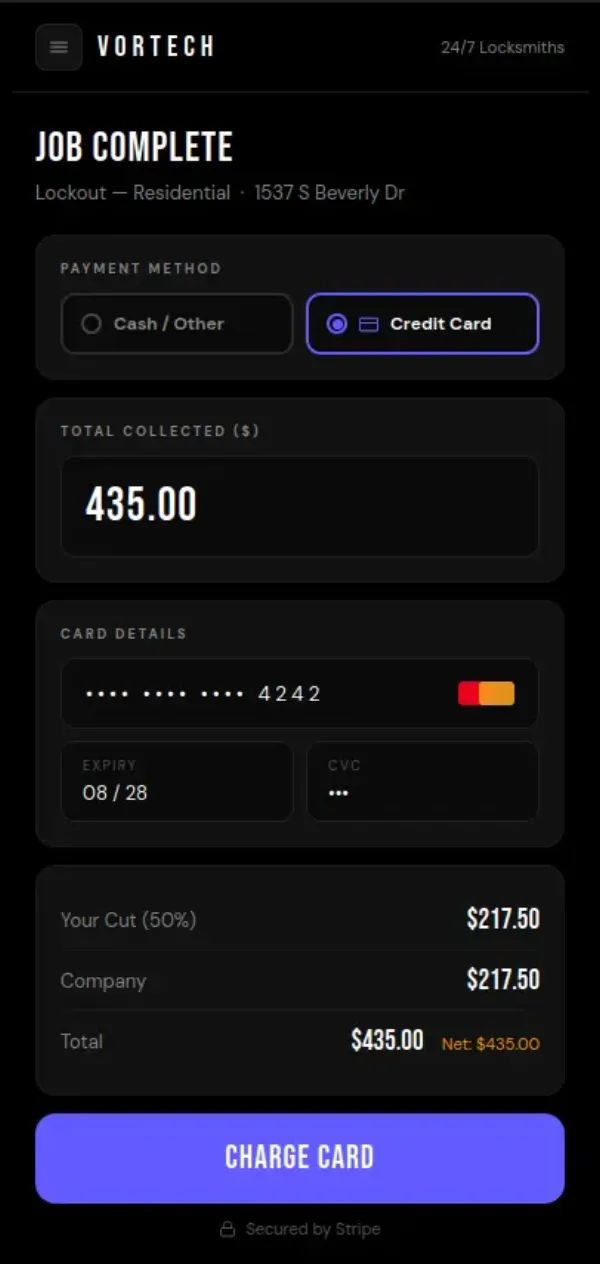
The tech charges the card directly from the app — before leaving the job site.
Snap a photo of the completed work
With payment done, the tech takes a photo of the completed work — the installed part, the repaired unit, the finished job — and uploads it directly to the job record in the app. The photo is timestamped, attached permanently to that job, and visible to the company owner from the dashboard. Photos stay on file for 30 days, giving the owner a review window for every job that closed that week. If a customer calls back, the photo record answers the question before it becomes a dispute.
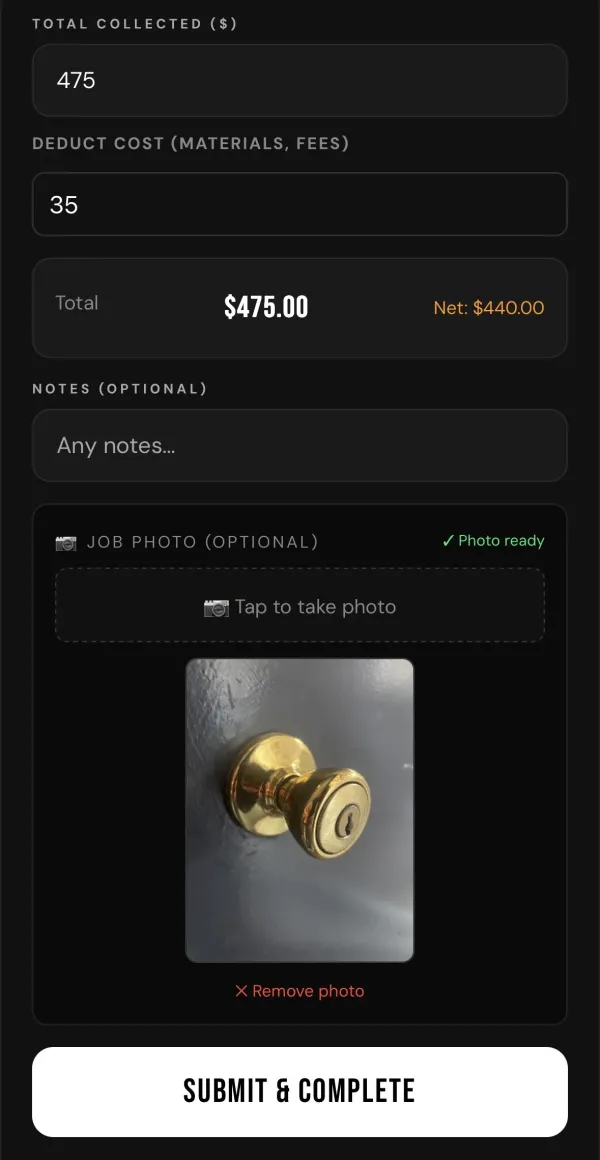
The tech snaps a photo of completed work — it timestamps automatically and attaches to the job record.
Send the customer a text receipt
The last step before leaving: the tech sends the customer a text receipt directly from the app. The customer gets a written record of what was done and what was charged, delivered to their phone in seconds. No more “can you email me something?” requests. No more customers who feel like they handed money to a stranger and got nothing back. The text receipt is the professional close — and it eliminates the most common source of after-the-fact payment disputes.
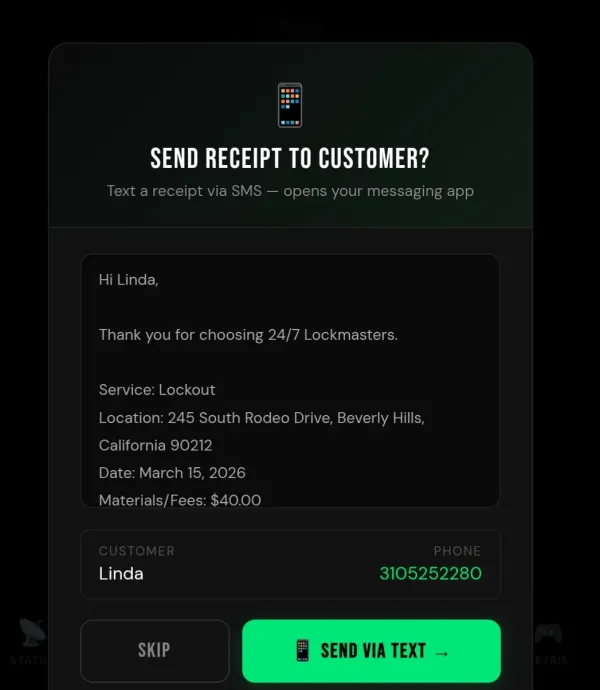
The customer gets a text receipt the moment the job closes — directly from the tech’s phone.
That’s the whole job-close sequence. Card charged, photo taken, receipt sent. Under two minutes, before the truck moves. By the time the tech pulls away, the owner has the payment record, the completion photo, and confirmation that the customer received something in writing — without a single phone call between them.
What the owner sees
From the company dashboard, every closed job shows the amount collected, the photo documentation, and the receipt confirmation. You’re not waiting to piece the day together at 8pm. The record builds in real time as your techs close jobs across the city.
And because the photo file is held for 30 days, you have a rolling review window. If a tech is consistently closing jobs with blurry photos, or skipping the photo step, or collecting less than expected — you see it in the pattern, not in a customer complaint three weeks later.
This is genuinely what accountability looks like in a trades operation without micromanagement. You’re not calling techs to check in. You’re not chasing receipts at end-of-day. The system captures the close and you review when you want to — the record is there either way.
How job amounts feed into tech pay automatically
The job amount the tech enters at close doesn’t just sit in the record. It feeds directly into the pay calculation.
Here’s how that works:
The automatic pay cycle
Each technician in Vortech Pro has their own custom commission split set in their profile — whatever percentage you’ve agreed with them. When a tech closes a job, the amount flows into that week’s running total. If the tech covered an out-of-pocket expense on the job — a part they bought, a material cost — that deduction is applied first. The commission split is then calculated on the remaining amount, after the deduction, so the tech is made whole on what they spent and the split is fair.
Every Monday at 3 AM, the pay cycle closes automatically. The system calculates each tech’s exact earnings for the week: jobs closed, deductions applied, commission split calculated. The owner sees the exact balance owed to each technician. When you pay them — by whatever method you use — you mark it as paid in the app. Clean, exact, no spreadsheet required.
This matters for more than convenience. When your pay calculation runs off the same job records that include the photo and the payment, everything ties together. The job amount that fed the Stripe charge is the same amount that fed the tech’s earnings calculation. No manual entry, no re-keying, no version where the tech’s number and the system’s number don’t match.
It also makes tax time and 1099 filing dramatically simpler. Every tech’s annual earnings are already calculated, week by week, in the system. Your accountant gets exact numbers from real records, not a reconstruction.
Why this matters more as you grow
At one tech, you probably know what’s happening on every job because you’re often there. At three techs, you’re managing mostly by phone. At five or more, the manual system actively breaks — you can’t keep track of what every tech collected, what every customer received, and what every job looked like when it closed. You’re operating on hope.
The job-close workflow described here doesn’t require trust in place of information — it creates information. Every tech, every job, the same three steps. The record is there whether you check it today or next week. And the pattern across jobs — photo quality, collection rates, timing — tells you things about how your operation is actually running that you can’t see any other way.
This is what separates a trades business that scales cleanly from one that hits a ceiling at three or four techs because the owner can’t let go of the wheel. When every job close creates a verifiable record automatically, the owner can step back without losing visibility. That’s not a luxury feature — it’s the infrastructure that makes growth possible without chaos.
For the broader picture of what a trades business needs from field service software to support this kind of operational structure, the field service software buyer’s guide covers what to actually look for and how to evaluate the options honestly.
Every Job Close. Documented. Automatic.
In-field card payments, photo proof attached to the job, text receipt to the customer, and automatic weekly pay calculation per tech. $99/month for 5 techs, no contracts, no setup fees. See how it works with a 30-day free trial.
The bottom line
The end of a job is where a trades business either captures value or leaks it. Payment uncollected, work undocumented, customer left without a receipt — each of those is a small failure that compounds across hundreds of jobs a year into real money and real reputation damage.
The fix isn’t more phone calls or tighter management. It’s a job-close sequence that every tech runs from their phone, every time, before they leave the site: charge the card, snap the photo, send the receipt. Two minutes, three steps, and the owner has everything they need — proof, payment, paper trail — without being there.
That’s not just an operational improvement. It’s the difference between a business that depends on the owner being everywhere and one that runs consistently whether the owner is watching or not. For a trades business trying to grow past a handful of techs, that distinction is everything.